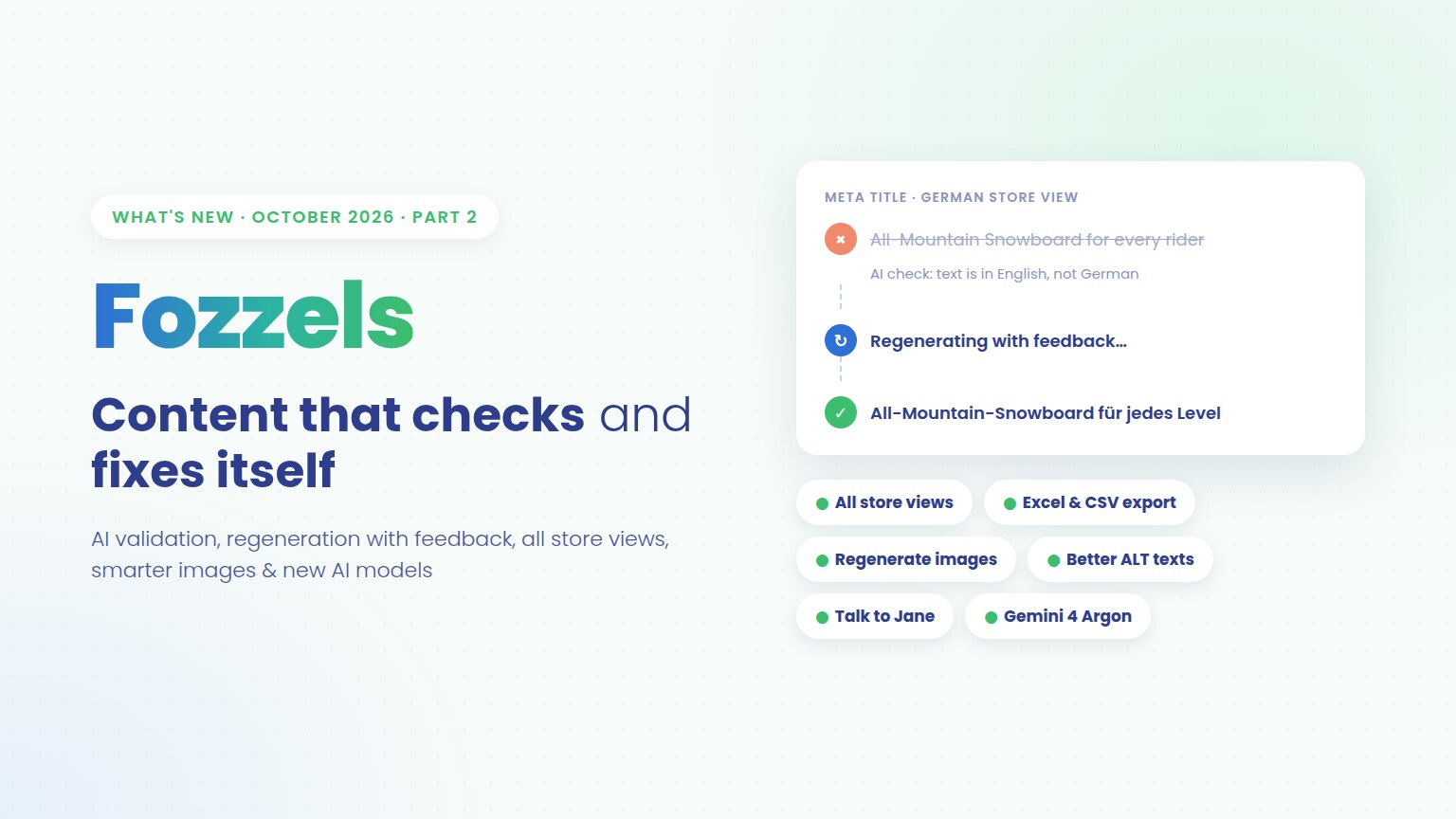
Earlier this month we gave you 13 attributes per Flow, Workflows and a brand-new prompt editor. Part 2 builds on that with one big idea: you should only have to look at the content that really needs you. Fozzels now checks every generated text with AI and fixes what’s wrong on its own, before anything reaches your shop.
On top of that: one text for all your Magento store views, images you can fine-tune with a single click, ALT texts that finally replace those “IMG_2045.jpg” placeholders, exports straight to Excel, and a fresh line-up of AI models. Here’s what it all means for you.
1. Content that checks and fixes itself
Every AI model occasionally writes something you can’t publish: a “Here is your description:”, a placeholder like “[Product name]”, a text in the wrong language, or a sentence that stops halfway. Until now, finding those texts meant reading them. Not anymore.
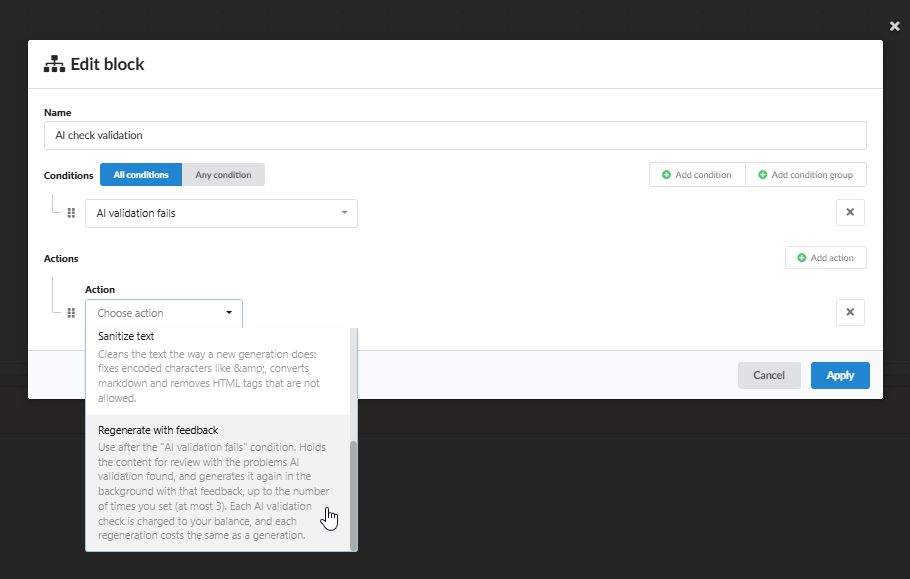
With the new AI check in Workflows, a second AI model reads every generated text before it moves on. Does it pass? It goes to review or straight to your shop, exactly as you set up your Flow. Does it fail? Fozzels tells the AI what was wrong and generates the text again automatically, in the background. You decide how many attempts it gets (up to three). Only if the text still isn’t right after the last try does it land on your desk, with a clear reason, so you know exactly what to fix.
The AI check catches the mistakes that cost you the most time and credibility:
- Not real content — refusals, questions back, “lorem ipsum” or empty template tags.
- The AI talking to you — “Let me know if you need changes” or visible reasoning.
- The wrong language — English text in your German store view.
- The wrong product — a text about earbuds on the page of an earbuds case.
- The wrong format — a full description where a title should be, or a text cut off mid-sentence.
What this means for you: you can scale up content generation without scaling up your review work. Your team spends its time on the handful of texts that really need a human, and your shop stays free of AI slip-ups. An AI check costs much less than a generation, so the safety net is affordable on every Flow.
Three more things make your content cleaner out of the box:
- Automatic regeneration, even without a workflow. Texts marked as suspicious are regenerated in the next generation round.
- New action: Sanitize text. Cleans up encoded characters like
&, converts markdown and removes HTML that isn’t allowed. - Fewer false alarms. Normal product specs such as “Breite – 80” or “+25 °C” are no longer flagged as suspicious, so you spend less time on texts that were fine all along.
Set it up in a few minutes with our step-by-step guide: Workflows Lesson 3: Automatic AI Check and Regeneration.
2. One text for all your Magento store views
Running a main store and an outlet in the same language? Or several store views that should simply show the same product texts? Until now, that meant a separate Flow for every store view. With the new option Also save as the default value for all store views, one Flow does it all: each push saves the text to the Flow’s own store view and as the default value for every other store view in Magento 2.
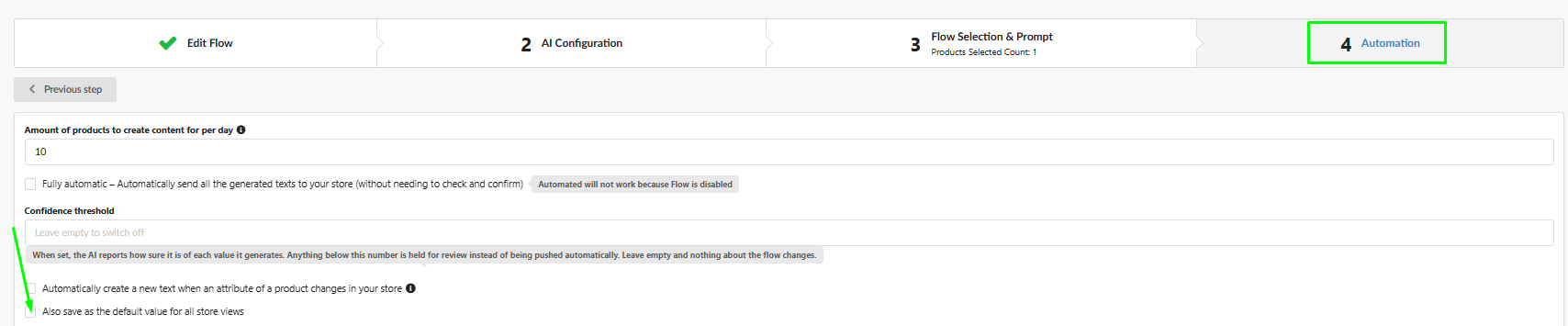
What this means for you: fewer Flows to manage, no duplicate generations, and the same high-quality text everywhere your customers shop. Store views that have their own text in Magento keep it, so your local exceptions stay safe. Read exactly how it works in How to Sync Generated Content to All Store Views in Magento 2.
3. Images: even closer to perfect
Regenerate with new settings. Not quite happy with a generated image? Click Regenerate and adjust the settings for just that one result: pick a different product photo as the starting point, switch AI model (for example from GPT Image to Nano Banana), or tweak the prompt and presets such as background, style and scene. Your Flow stays exactly as it is. The result: the perfect image for that tricky product in seconds, without rebuilding your Flow.
Images that stay up to date. Switch on Process the product again when its source image changes, and when a product photo changes in your shop, Fozzels creates a new image from the updated photo. Your generated visuals always match the product you actually sell, without anyone having to keep track.
AI labels built in. Every image and video generated by Fozzels now carries an invisible, machine-readable label that marks it as AI-generated, in line with the transparency requirements of the EU AI Act. Use AI visuals in your shop with confidence, without adding labels by hand.
4. ALT texts that really describe your images
Many shops have ALT texts that are technically filled in, but say nothing: a file name like “IMG_2045.jpg” or just the product name. For search engines and for shoppers using a screen reader, that’s almost the same as no ALT text at all. ALT Flows now find these placeholders with the new condition has an image whose ALT contains, and replace them with meaningful descriptions.
What this means for you: better image SEO, better accessibility, and more visibility in image search and AI search, across your entire catalog in one go.
5. Your results, in your spreadsheets
Export your results to Excel or CSV and choose exactly which columns go into the file, for example just the SKU and the generated description. Name the column after your attribute code, and the file is ready to import into your shop, PIM or ERP. Fozzels remembers your choice for next time. Perfect for sharing results with colleagues, translators or agencies, and for feeding systems that don’t have a direct integration.
6. New AI models for every task
We add new models as soon as AI providers release them, so you always have the best fit for each job:
- Gemini 4 Argon — Google’s new flagship, built for accuracy and one of the least likely models to invent facts. A strong choice for detailed, spec-heavy product content.
- Claude Haiku 5.5 — Anthropic’s fastest and most affordable model, ideal for large catalogs.
- GPT Image 2.5 Flare — fast, high-quality image creation and editing for everyday use.
- GPT Image 2.5 Sunburst — OpenAI’s highest-quality option, with precise edits that leave the rest of the image, including your product, untouched.
- Nano Banana 2.1 — better quality at a lower price than Nano Banana 2.
- HeyGen Video 1.0 — a much more affordable alternative to Veo for product videos.
7. Talk to Jane, now also in Italian
You can now speak to Jane, our AI assistant, instead of typing. Click the microphone, ask your question, and Jane can read her answer out loud. And the Fozzels app is now available in Italian, with our Help Center in Italian and French too.
And there’s more
- Replace existing product photos in Magento and NextChapter with newly generated images.
- AVIF images in Shopware can now be used for text generation.
- Errors at a glance: the “Display only with errors” filter shows only failed generations, with the actual error message.
- Notifications after a repull, removed products clearly marked in Image and Video Flows, and thumbnails for generated videos.
Want all the details? Read the full release notes on our Help Center.
Start using it today
Everything above is live in your account right now. Log in, add an AI check to your Workflows, and let Fozzels take care of the texts that used to need your attention. Need help with the setup? Ask Jane in the app, or contact your account manager.
Not a Fozzels user yet? Request a demo and see how Fozzels fills your entire catalog with content you can trust.
Should you have any comments, remarks, or questions, please reach out to support@fozzels.com.
Happy prompting,
The Fozzels Team